

| Steps | Details |
|---|---|
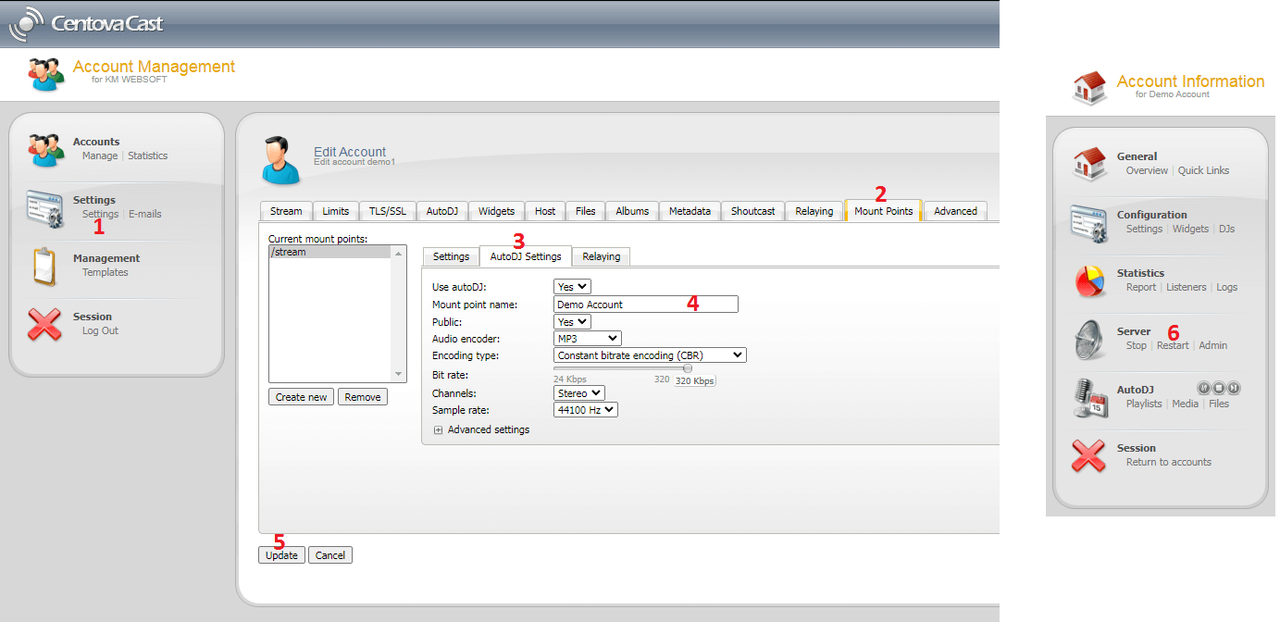
| Step 1: | Login to the centova panel, and click on Settings |
| Step 2: | Click on the Mount Points tab, (as shown in the below image with point #2) |
| Step 3: | Then click on the AutoDJ Settings tab, (as shown in the below image with point #3) |
| Step 4: | Then click on the text box where label = Mount point name, entered in the name of the mount point you want to set. (as shown in the below image with point #4) |
| Step 5: | Then click on the Update button as shown in the below image with point #5 |
| Step 6: | Finally, Restart the radio server (as shown in the below image with point #6) |
Shoutcast - Icecast Radio Hosting
Shoutcast Icecast radio hosting - Internet radio with unlimited storage, bandwidth, auto DJ, unlimited listeners, FREE unlimited DDoS protection, best price